What Happens Behind the Scenes During a General Session
A polished general session depends on more than what the audience sees. Learn how audio, video, lighting, playback, comms, and show calling work together behind the scenes.
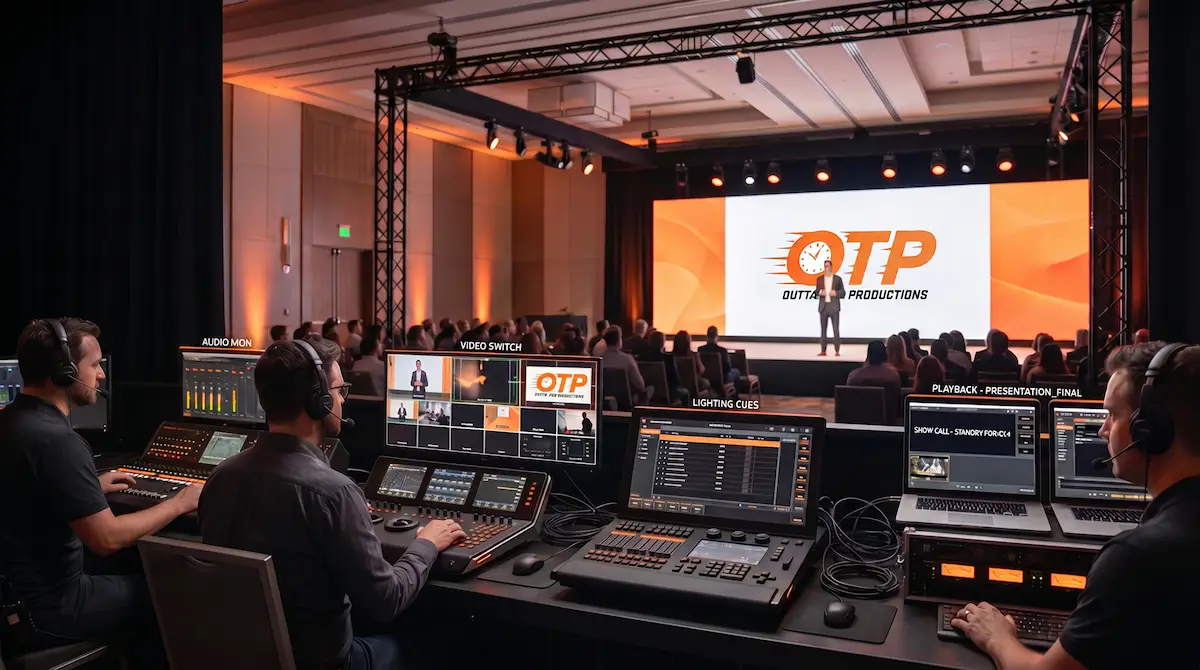
A great general session should feel effortless from the audience’s point of view.
The lights change at the right moment.
The presenter walks onstage with confidence.
The slides appear cleanly.
The microphones sound clear.
The video plays without hesitation.
The transitions feel intentional.
But that smooth experience does not happen by accident.
Behind every polished corporate event general session is a connected production workflow. Audio, video, lighting, playback, communications, show calling, presenter support, and room awareness all have to move together. When those pieces are aligned, the audience sees confidence. When they are not, the event starts to feel disconnected fast.
At Outta Time Productions, we treat the general session as the center of the live event experience. It is where the message, the audience, the presenters, and the technical environment all meet.
The General Session Is More Than a Meeting
A general session is often the most visible part of a corporate event.
It may include executive remarks, keynote presentations, sponsor recognition, awards, videos, panels, product announcements, training moments, and audience engagement. It is usually where the largest audience gathers and where the most important messages are delivered.
That means the general session carries weight.
It is not just a room with screens and microphones. It is a live communication environment. Every cue, transition, visual, and audio choice affects how the audience receives the message.
That is why professional live event production is about more than setting up equipment. It is about shaping the experience from behind the scenes.
Show Calling Keeps the Session Moving
One of the most important behind-the-scenes roles is show calling.
The show caller (technical director) helps guide the timing of the session. They cue presenters, playback, lighting changes, microphone changes, walk-up moments, graphics, and transitions. They are watching the bigger picture while each technical department focuses on its specific role.
A strong show caller helps answer questions like:
- When does the presenter walk?
- When does the video roll?
- When do lights shift?
- When does the microphone go live?
- When does the next slide or graphic appear?
- When does the room move into Q&A?
- What happens if the session runs long?
Without clear show calling, the crew may still know their individual tasks, but the session can lose its rhythm. With strong show calling, each moment has direction.
The audience may never hear the calls. They only feel the result.
Audio Carries the Message
If the audience cannot hear clearly, the event immediately loses impact.
Audio is one of the most important parts of a general session because it carries the message itself. Microphones, playback audio, walk-in music, walk-up music, panel discussion levels, audience Q&A, and remote feeds all need attention.
Behind the scenes, the audio team is managing far more than volume.
They are watching microphone levels, preventing feedback, balancing music and speech, preparing backup microphones, managing transitions between speakers, and making sure the room feels clear without feeling harsh.
For presenters, audio also affects confidence. A speaker who can trust the microphone can focus on delivery. A speaker who is distracted by audio issues may start to lose connection with the room.
That is why audio support is both technical and human.
Video and Playback Keep the Visual Story Aligned
Slides, videos, logos, sponsor loops, lower thirds, walk-in content, and branded visuals all shape how the audience experiences the session.
Behind the scenes, playback operators are responsible for making sure the right content appears at the right time. That includes checking slide decks, testing videos, confirming aspect ratios, preparing backup files, and staying ready for last-minute changes.
A single missed video cue or incorrect slide can interrupt the flow of the room. A clean playback workflow helps prevent that.
This is especially important when presenters arrive with updated content or changes happen close to show time. As we covered in Handling Last-Minute Production Changes, live production works best when the team has a calm process for absorbing updates without disrupting the session.
The goal is simple: the screen should support the moment, not distract from it.
Lighting Shapes the Room Before Anyone Speaks
Lighting does more than make the stage visible.
It sets mood, directs attention, supports camera quality, and helps the audience understand where to look. A lighting shift can signal that a keynote is starting, an awards moment is beginning, or the session is moving into a more intimate conversation.
Behind the scenes, lighting is coordinated with the run of show. The crew may adjust looks for walk-ins, presenter entrances, panels, videos, awards, Q&A, and closing remarks.
Lighting also affects how premium the event feels. A stage can have strong content and experienced speakers, but if the lighting feels flat or inconsistent, the room may not feel as polished.
Good lighting supports the message without calling attention to itself.
Comms Keep the Crew Connected
Headset communication is one of the quietest but most important systems in a general session.
The audience does not hear it, but the crew depends on it.
Comms allow the show caller, audio, video, lighting, playback, stage management, camera operators, and production leads to stay aligned in real time. If a presenter is delayed, a video changes, a microphone needs to be swapped, or timing shifts, the team can respond quickly.
Without clear communication, small changes become bigger problems.
With clear communication, the crew can adjust without making the planning team feel like every issue has become an emergency.
That is one of the biggest differences between basic technical coverage and a connected production workflow.
Presenter Support Starts Before the Walk-On
A polished general session depends heavily on how prepared the presenters feel.
Before a presenter walks onstage, the production team will help with microphone placement, clicker testing, slide checks, confidence monitor review, stage orientation, timing notes, teleprompting support, and entry cues.
These details matter because presenters carry the most visible part of the session. If they feel uncertain, the audience can feel it. If they feel supported, the delivery becomes stronger.
This is why presenter support should be part of the production plan, not an afterthought. We explored this more deeply in How to Keep Presenters Comfortable Before They Walk Onstage.
Behind the scenes, the goal is to remove friction before it reaches the stage.
Backup Plans Stay Quiet Until They Matter
The best backup plans are often invisible.
A secondary playback machine will be ready.
A spare microphone will be prepared.
A backup cable will be close by.
A second copy of the deck will be loaded.
An alternate plan will already be understood by the crew.
The audience may never know those layers exist.
But if something changes, those backup systems help keep the session moving. Professional production does not assume everything will go perfectly. It prepares for the variables that live events can bring.
That preparation is part of what separates a production partner from someone who only provides gear. As discussed in Why Backup Plans Are Part of Professional Event Production, contingency planning helps protect the moments that matter most.
The Run of Show Becomes a Technical Map
A basic schedule tells people what time things happen.
A production-ready run of show tells the crew how the event moves.
It includes cues, content notes, presenter details, walk-up moments, video timing, microphone assignments, lighting looks, transitions, and backup considerations. It gives the team a shared reference point so the general session can move with intention.
Behind the scenes, the run of show is not just a document. It is a map.
It helps every department understand what is coming next, what matters most, and where changes may affect the flow. When the run of show is clear, the crew can support the event with more confidence.
When it is vague, the crew has to make too many decisions in real time.
The Audience Feels the System, Even If They Never See It
Most attendees do not think about show calling, playback systems, headset communication, microphone plans, or lighting cues.
They think about how the event feels.
Does it feel organized?
Does it feel polished?
Can they hear clearly?
Can they see the content?
Do transitions feel smooth?
Do presenters seem confident?
Does the room feel controlled?
Those impressions come from the system behind the scenes.
A strong general session is not built from one department doing one thing well. It is built from multiple departments working together toward the same experience.
Behind the Scenes Is Where the Show Is Protected
The visible part of a general session is only one layer.
Behind it is preparation, communication, timing, technical awareness, backup planning, and a crew that understands how live events move. That behind-the-scenes work is what allows the front of the room to feel calm, polished, and intentional.
At Outta Time Productions, we support general sessions by connecting the technical details to the purpose of the event. From live events and hybrid events to video production, our goal is to help every cue, presenter, and message land with confidence.
If you are planning a corporate event and want a production team that understands what has to happen behind the scenes, contact our team.
The audience sees the stage. The success of the session is built in the moments, systems, and decisions working quietly behind it.