
Confidence Monitor or Teleprompter: What Does Your Presenter Actually Need?
Confidence monitors and teleprompters both help presenters stay on track, but they solve different problems. Here is how to choose the right option for your event.
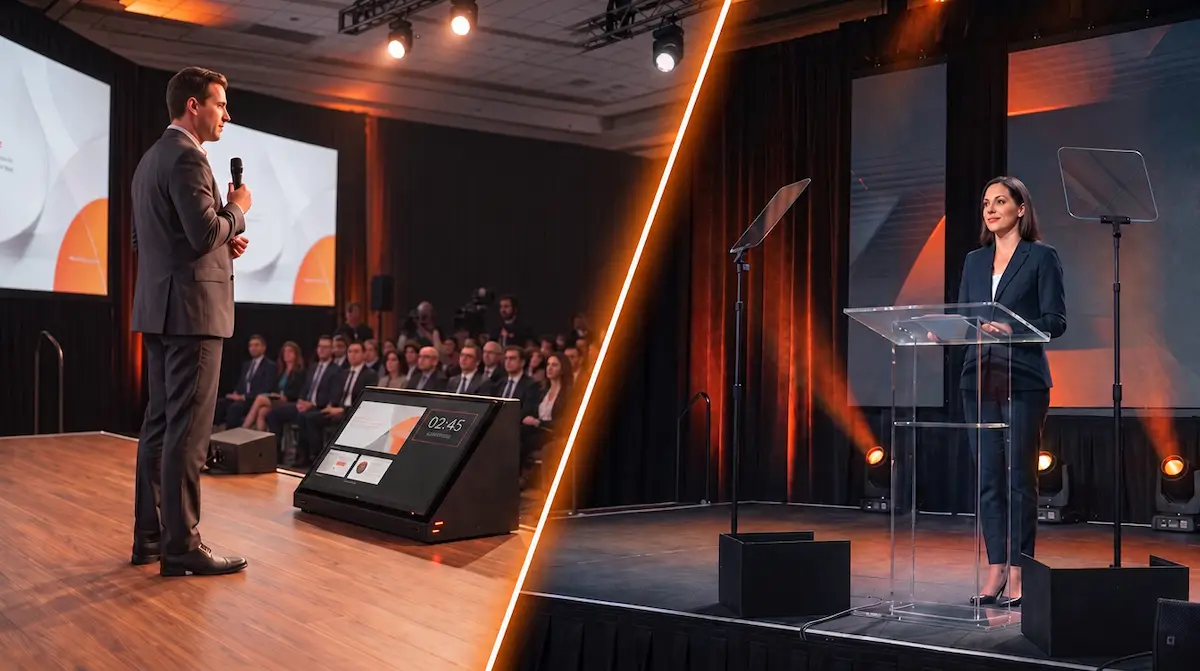
A presenter walks onstage with a slide deck, prepared remarks, and twenty minutes to deliver them.
What should they have in front of them?
A confidence monitor?
A teleprompter?
Both can help a presenter stay on track, but they solve different problems.
The right choice depends on what the presenter actually needs to see.
What Is a Confidence Monitor?
A confidence monitor is a display positioned where the presenter can see it without repeatedly turning around to look at the main screen behind them.
Depending on the production, it might show:
- the current slide
- the next slide
- presenter notes
- a countdown timer
- time of day
- short production cues
For many corporate presentations, this is all the presenter needs.
They already know what they want to say. They simply need visual confirmation that the correct slide is on screen, what comes next, or how much time remains.
When a confidence monitor is positioned near the front edge of the stage, it is commonly referred to as a DSM, or downstage monitor.
In many corporate event environments, you may hear production teams use "DSM" and "confidence monitor" almost interchangeably.
When Is a Confidence Monitor the Better Choice?
A confidence monitor works best when the presenter mainly needs reference information, not a word-for-word script.
It can be useful for:
- keynote presentations built around slides
- executives who already know their material
- presenters who want to see the current or next slide
- panel moderators who need timing information
- sessions where speakers need a visible countdown
- presenters who tend to turn around to check the main screen
On larger stages, two downstage monitors may be used so presenters can move naturally without constantly returning to one position.
The setup should support how the presenter moves rather than force them to work around the equipment.
When Does a Teleprompter Make More Sense?
A teleprompter is designed for scripted delivery.
Instead of giving the presenter occasional reference information, it allows them to follow prepared text while maintaining a more natural eyeline.
For live corporate events, that may be useful for:
- executive remarks that require precise wording
- major announcements
- awards programs
- investor or leadership presentations
- speeches containing legal or regulatory language
- tightly timed scripted segments
- presenters who are more comfortable working from prepared remarks
For stage presentations, presidential-style teleprompters are commonly used with transparent glass positioned near the lectern or presentation area.
The presenter reads reflected text while looking through the glass toward the audience.
For video production, a camera-mounted teleprompter can instead place the script directly in the camera's eyeline.
The application is different, but the purpose is similar: helping the speaker deliver prepared language without constantly looking down at notes.
A Teleprompter Is Not Automatically Better
Adding a teleprompter does not automatically make a presenter more polished.
Reading from one is a skill.
If the script is written like a document instead of spoken language, the delivery may still sound unnatural.
If the scrolling pace does not match the presenter, they may begin chasing the words.
If they have never rehearsed with a teleprompter, show day is a poor time to discover whether they are comfortable using one.
That is why teleprompting should be treated as part of the presentation workflow, not simply another piece of equipment.
We discuss that process further in Teleprompting Support for Corporate Events.
Sometimes the Right Answer Is Both
There are productions where a presenter may benefit from both systems.
An executive might use a teleprompter for prepared remarks while a confidence monitor displays slides, timing, or other presentation information.
That can work well when the program actually requires it.
But every additional display creates another source of information for the presenter.
The goal should never be to surround the speaker with as many screens as possible.
Give them the information they need, where they naturally need to see it, and remove what they do not need.
Stage Layout Matters
Presenter support cannot be planned separately from the stage.
Monitor size and placement should consider:
- viewing distance
- presenter movement
- audience sightlines
- stage height
- camera positions
- lectern location
- scenic design
- available floor space
A confidence monitor that works perfectly for someone standing behind a lectern may be much less useful for a presenter walking across a large stage.
Teleprompter placement also affects where the speaker naturally looks.
These are details worth testing during the corporate event technical rehearsal, not five minutes before the presenter walks onstage.
Ask the Presenter What They Actually Need
The easiest way to choose the right system is to start with the presenter.
Ask:
Are you speaking from slides or reading prepared remarks?
Do you need to see the current slide, the next slide, or both?
Do you need speaker notes?
Do you need a timer?
Will you stay at the lectern or move around the stage?
Have you used a teleprompter before?
Those answers usually tell the production team far more than simply requesting "presenter monitors."
It also gives the presenter an opportunity to rehearse with the same workflow they will use during the event.
That preparation is one of the reasons keeping presenters comfortable before they walk onstage starts well before show time.
Use the Simplest Tool That Solves the Problem
A presenter who knows their material and only needs to see the next slide probably does not need a teleprompter.
A CEO delivering carefully scripted remarks probably should not be expected to read paragraphs from a monitor on the stage floor.
And a presenter who only needs to know whether they have five minutes remaining may simply need a timer.
The technology should support the presenter without becoming something they have to manage.
Outta Time Productions works with planners and presenters to determine what information needs to be visible onstage, how it should be displayed, and how that system fits into the rest of the production.
Whether that means confidence monitors, professional teleprompting, or a combination of both, the decision should begin with how the presenter actually needs to communicate.
Begin Planning early enough to make presenter support part of the rehearsal and production plan.
The best presenter technology is not the system with the most screens. It is the one that lets the speaker stop thinking about the technology.