
How to Plan Audience Q&A Without Losing Control of the Room
Audience Q&A can become one of the most valuable parts of a corporate event when it is planned properly. Learn how to manage microphones, moderators, timing, remote questions, and audience participation without making the session feel rigid.
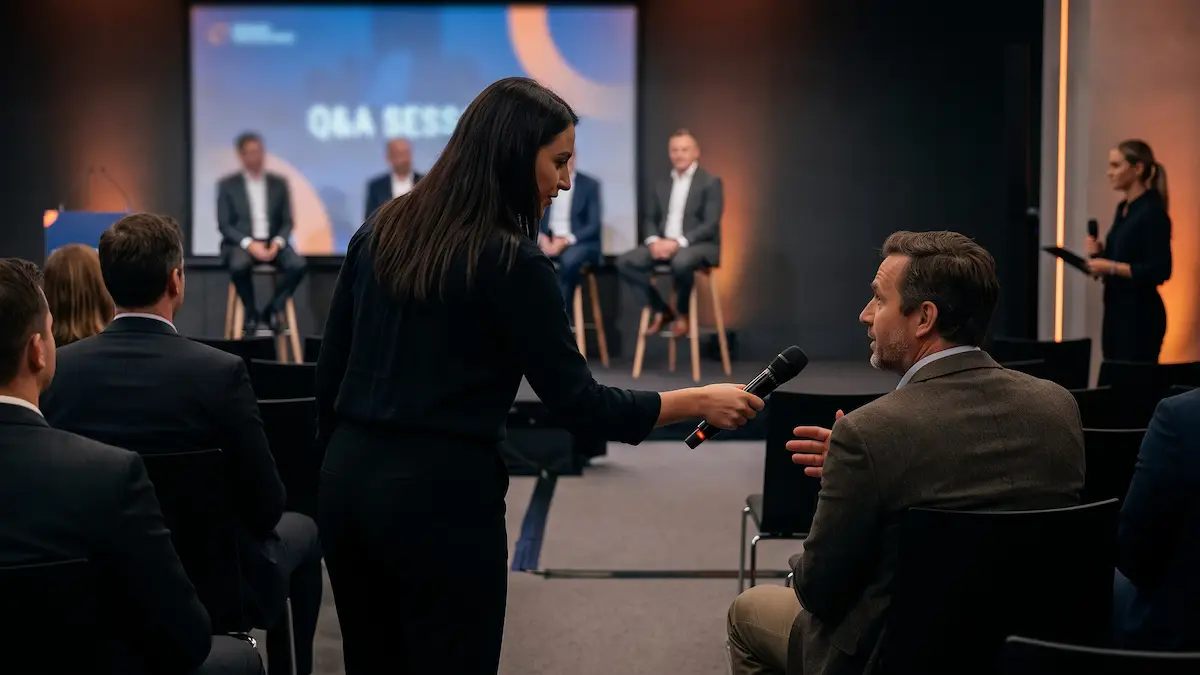
A keynote presentation can run flawlessly for forty-five minutes, only to lose its momentum the moment the speaker asks, “Any questions?”
The first attendee starts speaking before the microphone arrives, two people across the room begin talking at once, someone delivers a five-minute monologue instead of a question, and remote viewers are left listening to dead air because no workflow was established to route digital inquiries to the stage.
None of this means audience participation should be rigid or overly scripted. The goal is to give attendees an effortless way to participate while protecting the pacing of the program and ensuring everyone (in the back row, online, or reading live captions) can follow along.
At Outta Time Productions, we treat audience Q&A as an active element of the technical run-of-show rather than an unscripted afterthought. With a clear operational framework, the discussion feels more natural, engaging, and professional.
1. Establish the Question Format in Advance
Before deciding on hardware or floor logistics, determine which Q&A model serves the specific session:
- Roaming Microphones: Floor personnel or dedicated runners carry wireless handheld microphones directly to attendees as they are recognized. This approach works best for moderate-to-large ballrooms where attendees remain seated and the moderator directs the sequence of questions.
- Standing Aisle Microphones: Fixed microphones on stands are placed in central or outer aisles, allowing participants to line up. This suits large general sessions where continuous, open participation is expected and room layouts allow clear aisle traffic.
- Moderated Digital Inquiries: Attendees submit questions via event apps, QR-coded web forms, or virtual meeting chat. A facilitator curates and reads them aloud. This structure is ideal for time-restricted sessions, sensitive executive updates, or large hybrid audiences where similar themes should be consolidated.
- Hybrid Combination: The most effective modern corporate events blend physical and digital paths, combining roaming room microphones with dedicated digital queues for remote attendees.
2. Plan Audio Logistics and Floor Management
If a question matters to the meeting, it must reach a microphone. An attendee in a mid-sized room will often say, "I can speak loudly enough," but an unamplified voice immediately disconnects the speaker from the recording, the live stream, and the captioning pipeline.
Balance Room Coverage and Runner Staging
A single roaming microphone in a wide ballroom creates awkward dead air while the runner treks across five rows of seating. Structure microphone distribution based on room dimensions:
- Wide Ballrooms: Stage dedicated runners along both the left and right perimeters.
- Deep Auditoriums: Place standing microphones at the mid-point of the primary aisles to minimize attendee travel time.
- Panel Configurations: Ensure every panelist and facilitator has a dedicated, open channel so responses do not require passing hardware back and forth.
Establish Runner Protocols
Microphone runners are an integral part of the production crew. Prior to doors opening, brief them on specific floor rules:
- Positioning: Runners should watch the session moderator, not just the audience, to anticipate who will be called on next.
- Mic Handling: In general sessions, runners may hand the microphone to the attendee. During sensitive discussions or tight agendas, runners should hold the microphone firmly for the speaker to keep the program moving and prevent floor filibustering.
- The "Restate" Rule: If an attendee speaks before the runner arrives, train presenters and moderators to restate or summarize the question into their own microphone before delivering the answer.
3. Empower the Moderator and Set Ground Rules
A smooth Q&A relies on a prepared facilitator who knows how to steer the room without dampening its energy.
- Open with a 10-Second Roadmap: Before opening the floor, the moderator should clearly tell the room how Q&A will work, whether to wait for a runner, line up at an aisle stand, or scan a QR code on the main screen.
- Manage "Comments Disguised as Questions": When an attendee begins with "This isn’t really a question, but…" the moderator must protect the agenda. A professional pivot keeps things moving respectfully: "Thank you. What specific question would you like the panel to address on that topic?"
- Budget for Transition Time: A ten-minute Q&A block rarely yields ten minutes of pure answers. It must account for recognizing attendees, moving floor microphones, stating questions, and transitioning between topics.
4. Integrate Technical Distribution: Broadcast, Captions, and Cameras
Audience questions are core program content. The technical systems supporting the event must capture audience audio and video cleanly to deliver a seamless finished product.
| Production Element | Technical Consideration | Operational Best Practice |
|---|---|---|
| Hybrid & Remote | Online participants need a dedicated channel into the room. | Assign a remote moderator to feed virtual questions to the stage monitor or read them live on mic. See our guide on The Future of Hybrid Events: Better Audio, Better Cameras, Better Remote Experience. |
| Camera Tracking | Wide vs. close-up coverage for audience questions. | Decide in advance if camera operators will pan to audience members or remain framed on the stage to avoid abrupt, jarring camera moves. |
| Live Captioning | Human and automated captioners require isolated, clean audio. | Audience mics must feed the primary captioning bus so remote and accessibility feeds remain fully legible. Read more on Live Captions and Accessibility for Event Planners. |
| Post-Event Archiving | Master recordings must contain both sides of the dialogue. | Mix audience audio into the primary master record feed so future viewers are never left listening to answers without context. |
5. Build Clear Cues into the Show Flow
A well-run Q&A concludes as cleanly as it began. Leaving the wrap-up to chance often leads to an awkward pause while the planner, presenter, and technical director wonder who should close the session.
- The Warning Cue: With two minutes remaining, the moderator announces: "We have time for one final question." This alerts the room and signals the production booth to prepare the transition.
- The Hard Out Cue: The moderator closes with an explicit statement: "Thank you, everyone. That concludes our discussion."
- The Technical Sequence: That final statement serves as the immediate trigger for the production team to bring up walk-off music, switch the main displays to closing slides, adjust room lighting, and transition the livestream.
Designing Spontaneous, Structured Events
A successful audience Q&A is never an accidental success. The discussion feels open, engaging, and dynamic precisely because the underlying production mechanics were established well before the speaker stepped on stage.
Event planners should focus on high-level content strategy and attendee engagement without getting pulled into tracking runner positions, managing digital chat feeds, or troubleshooting unamplified floor audio.
When Outta Time Productions manages your technical production, we integrate Q&A workflows directly into the run-of-show, coordinating wireless audio coverage, hybrid streams, camera positions, and stage cues so your presenters and attendees can connect without friction.
Planning your next conference, panel discussion, or hybrid town hall? Begin Planning with our production team to ensure your audience is heard clearly from the first question to the final wrap.
The best Q&A feels entirely spontaneous to the audience because every operational detail behind it was mapped out in advance.