What Event Planners Should Know About Live Captions and Accessibility
Live captions can make corporate events more accessible, but effective captioning requires more than turning on a software feature. Here is what planners should understand before show day.
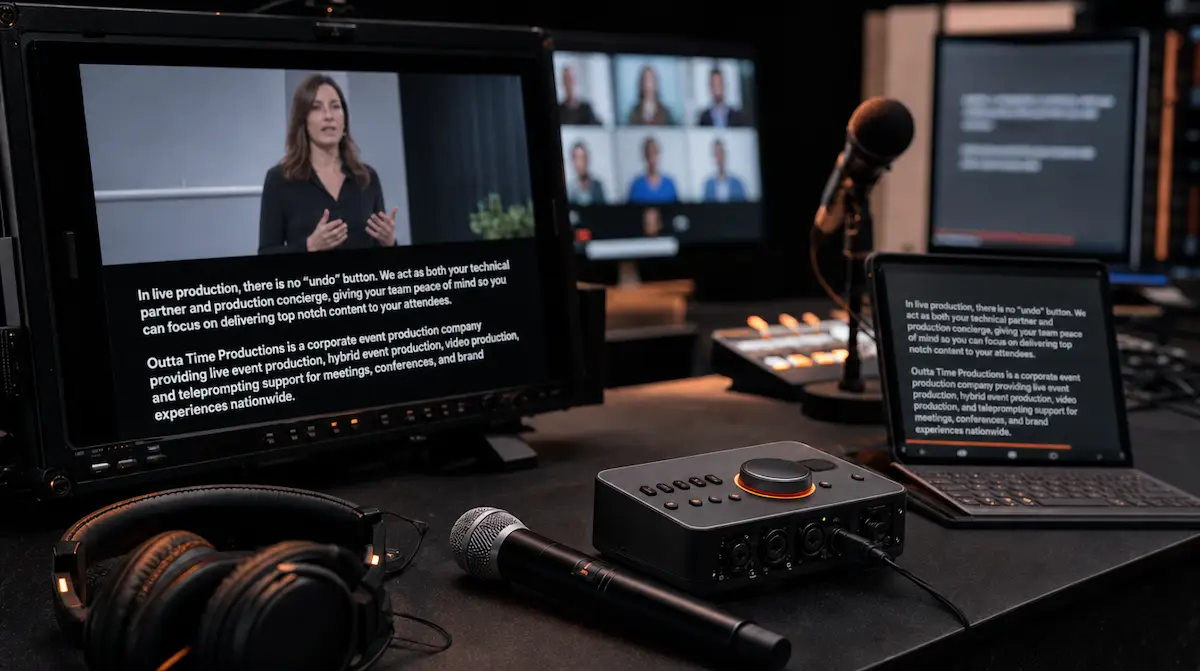
Live captions are becoming an increasingly important part of corporate meetings, conferences, hybrid events, training programs, and leadership presentations.
But captioning is not simply a feature that gets turned on five minutes before the event begins.
For captions to provide meaningful access, planners need to consider how the captions are created, what audio the captioning system receives, where the text appears, how audience questions are handled, and what happens when the event includes videos, remote presenters, or multiple people speaking at once.
Accessibility also extends beyond captions.
The most effective event plans consider how attendees receive spoken information, presentation content, visual information, audience interaction, and remote access throughout the entire program.
At Outta Time Productions, we believe accessibility should be discussed during preproduction so the technical plan can support it naturally rather than trying to add accommodations after the room is already built.
What Live Captions Actually Provide
Live captions convert spoken and other important audio information into synchronized text while the event is happening.
Good captions should communicate more than the words being spoken.
They may also identify the speaker and include significant non-speech audio when that information is necessary to understand what is happening.
For example, captions may identify when a new speaker begins, when music is playing, or when another meaningful sound affects the program.
That distinction matters.
A simple text transcript and live captions are not the same experience.
A transcript can be valuable after the event, but live captions allow an attendee to follow the information while the presentation is actually happening.
Captions Are Not the Same as Translated Subtitles
The terminology can vary between platforms and countries, but accessibility captions and translated subtitles are not always the same thing.
Captions are generally intended to represent the spoken audio and other important sounds for people who cannot fully hear the program.
Translated subtitles primarily convert spoken language into another language.
That means a multilingual event may need both accessibility captioning and language translation depending on the audience.
A production team should understand which service the client is asking for rather than assuming that one automatically replaces the other.
Open Captions and Closed Captions Serve Different Uses
Captions can be delivered in different ways.
Open captions are always visible and cannot be turned off.
Closed captions can usually be enabled or disabled by the viewer.
For an in-room event, open captions may be displayed on a dedicated screen, confidence monitor, side display, LED canvas, or another appropriately positioned display.
For a virtual or hybrid audience, the platform may allow attendees to control closed captions individually.
Neither approach is automatically better in every situation.
The right choice depends on the audience, room design, platform, content, and accessibility requirements.
The important part is deciding where the captions will appear before the technical system is built.
Automatic Captions and Human Captioning Are Different Tools
Many meeting and streaming platforms now include automatic speech recognition that can generate captions in real time.
That can be useful.
It should not automatically be treated as equivalent to professionally produced captioning in every situation.
Automatic captions can make mistakes, particularly when the audio is unclear, people speak over one another, specialized vocabulary is used, names are unusual, or there is significant background noise.
For events where accurate communication is especially important, planners may consider a professional real-time captioner or CART provider.
CART stands for Communication Access Realtime Translation. A professional captioner listens to the event and produces text in real time. The captioner may work onsite or remotely.
The appropriate solution depends on the event and the needs of the participants.
A routine internal meeting may use a different workflow than a major leadership presentation, public conference, medical program, legal discussion, or event where a specific accessibility accommodation has been requested.
Audio Quality Directly Affects Caption Quality
Captioning begins with audio.
If the captioning system or captioner cannot clearly hear the speaker, the quality of the text can suffer.
This is one reason proper microphone use matters even in smaller rooms.
Every speaker who needs to be captioned should ideally reach the captioning system through the event’s audio system rather than relying on distant room sound.
That includes:
- podium presenters
- wireless microphone users
- panelists
- audience questions
- remote presenters
- video playback
- prerecorded announcements
- moderators
Audience Q&A is particularly important.
If an attendee asks a question from the middle of the room without a microphone, the people in the room may hear enough to understand it while the remote captioner or automated captioning system does not.
A better workflow uses audience microphones or has the moderator repeat the question clearly into a microphone before answering.
Clear audio helps the audience, the recording, the remote participants, and the captioning system at the same time.
Give Captioners Information Before the Event
Professional captioning works better when the captioner understands the subject matter.
When possible, planners should provide relevant materials in advance.
That may include:
- presentation decks
- speaker names
- company names
- executive titles
- technical terminology
- acronyms
- product names
- agenda information
- session titles
This is especially important when the program contains specialized language that may not be obvious from ordinary conversation.
A financial conference, medical program, technology presentation, or industry meeting may include terminology that needs to be recognized correctly in real time.
Providing information in advance gives the captioning provider an opportunity to prepare.
It also requires cooperation from speakers and presenters early in the planning process.
Plan Where People Will Read the Captions
Providing captions is only useful if attendees can actually see them.
For an in-person event, the production team should consider:
- screen size
- viewing distance
- room layout
- caption position
- contrast
- seating angles
- whether captions compete with presentation content
- whether an interpreter is also visible
- whether several displays need caption feeds
A ballroom with one centered screen may require a different solution than a wide meeting room with two projection screens or several LED surfaces.
Sometimes captions can be integrated into the main presentation layout.
In other situations, a dedicated display may be more appropriate.
The text should not cover important presentation graphics, speaker names, charts, or other information the audience also needs to see.
Caption placement should be part of the visual design discussion, not an afterthought.
Presentation Accessibility Matters Too
Captions solve an important audio-accessibility problem.
They do not make the entire event accessible by themselves.
Presentation materials also need attention.
Slides should use readable text, sufficient contrast, and appropriately sized visual elements for the room.
Important visual information should also be explained verbally.
For example, a presenter should not simply say:
“Everything you need is shown on this chart.”
A participant who cannot clearly see the chart may receive very little information from that statement.
A better presenter explains the important conclusion represented by the graphic.
Providing accessible presentation files to participants before or after the event can also help people who need to review the material using their own devices or assistive technology.
Ask About Accessibility Needs During Registration
Event planners should not have to guess what every attendee needs.
One of the most useful steps is simply asking.
Registration forms can include a question that allows attendees to request accessibility accommodations or communicate specific needs.
That might involve:
- live captions
- sign language interpretation
- assistive listening
- accessible seating
- accessible digital materials
- mobility accommodations
- alternative participation methods
This allows the planning team to respond before event day.
It can also prevent assumptions.
For example, captions may be helpful to one attendee while another may specifically need an interpreter or another form of communication support.
Accessibility is more effective when planners understand the actual needs of the participants.
Captions Should Include More Than the Main Presenter
A common mistake is planning captions only for the person standing onstage.
Corporate events often involve much more audio than that.
A complete captioning workflow may need to account for:
- panel discussions
- audience questions
- remote speakers
- videos
- walk-on music
- moderator comments
- prerecorded content
- offstage announcements
If a video is played during the presentation, the audio from that video should also be accessible.
Whenever possible, prerecorded videos should already contain accurate captions.
If the live captioning system is expected to caption the video playback instead, the production team should confirm that the captioner or platform receives that audio.
Hybrid Events Need Captions in More Than One Place
Hybrid events create an additional challenge because the in-room and remote audiences may receive the program differently.
The in-room audience may need captions displayed on physical screens.
Remote attendees may receive captions through the streaming or meeting platform.
The production team needs to confirm where the caption data is going and who controls it.
Questions to answer before the event include:
- Are captions visible in the room?
- Are they available to remote viewers?
- Are they open or closed?
- Can remote attendees turn them on individually?
- Does the remote platform support the chosen captioning provider?
- Does the captioner receive clean program audio?
- Are remote presenters included in the caption feed?
- Are captions included in the recording?
These workflows should be tested before the audience arrives.
This is another reason hybrid event production should be treated as a complete production system rather than simply adding a video call to an in-person meeting.
Speaker Visibility Also Supports Accessibility
Accessibility is not limited to text.
Some attendees rely heavily on seeing the speaker’s face and mouth while listening.
That means presenters should be properly lit and visible.
For hybrid events, camera framing should allow remote viewers to clearly see the person speaking.
A speaker standing in deep shadow or facing away from the audience can make communication more difficult even when the audio system is working properly.
Good lighting, appropriate camera placement, and thoughtful presenter positioning support both production quality and accessibility.
Accessibility Should Extend to Audience Participation
A presentation may be captioned perfectly and still create barriers during audience interaction.
For example:
- questions may only be accepted through an inaccessible digital tool
- attendees may be asked to respond verbally without microphones
- polling may require a mobile device
- instructions may only appear visually
- Q&A may happen too quickly for some participants to respond
Planning multiple ways to participate can make the meeting more inclusive.
That may include spoken questions, written questions, moderated Q&A, accessible digital submissions, or alternate ways to provide feedback.
The exact approach depends on the program.
The important part is recognizing that accessibility applies to participation as well as presentation.
Review Captions Before Publishing the Recording
Live captions are produced in real time.
That means they may contain errors.
If the event recording will be published afterward, the captions should be reviewed and corrected as needed before they become the permanent version.
This is particularly important when the content includes:
- names
- numbers
- technical terminology
- financial figures
- medical terminology
- legal information
- product names
- confidential or sensitive subjects
A live captioning feed can provide a useful starting point for the recorded version, but the permanent recording should not automatically assume that every live caption was correct.
For companies that plan to reuse event material, accessibility should also become part of the post-event content strategy.
Accessibility Requirements Are Not Identical for Every Event
There is no single captioning rule that applies to every corporate event in exactly the same way.
In the United States, the Americans with Disabilities Act includes effective communication requirements for certain covered entities, including state and local governments and businesses and nonprofit organizations that serve the public.
Real-time captioning is one of several types of auxiliary aids and services recognized by the Department of Justice.
The appropriate accommodation depends on factors including the individual’s communication method, the nature and complexity of the communication, and the context.
That means planners should be cautious about making blanket statements such as:
“Automatic captions make the event ADA compliant.”
Accessibility and legal compliance are more nuanced than turning on one feature.
When a client has a specific legal or accommodation question, the appropriate organizational, accessibility, HR, or legal resources should be involved.
The production company’s role is to make sure the technical system can support the solution that has been selected.
Accessibility Works Best When It Is Planned Early
Live captioning affects several parts of the production system.
It may require:
- an audio feed
- an internet connection
- a captioning provider
- platform configuration
- display space
- screen routing
- presentation coordination
- Q&A microphones
- remote testing
- recording considerations
Those pieces are easier to manage during preproduction than minutes before doors open.
A production partner can coordinate with the event planner, venue, captioning provider, presenters, streaming platform, and technical crew to make sure the caption workflow actually reaches the people who need it.
At Outta Time Productions, our role is not to decide what accommodation an attendee should receive.
Our role is to help create the production infrastructure that supports the event’s accessibility plan, from microphones and presentation systems to hybrid production, displays, recording, and technical coordination.
For more guidance on building a stronger experience for both onsite and remote audiences, see The Future of Hybrid Events: Better Audio, Better Cameras, Better Remote Experience.
If accessibility, live captions, remote participation, or presentation support will be part of your next corporate event, contact Outta Time Productions early enough to include those requirements in the production plan.
Accessibility works best when it is part of the event design, not something added after the room is already built.