
The Pre-Show Experience: Your Event Starts Before the First Speaker Walks Onstage
A corporate event begins before the opening speaker takes the stage. Learn how music, lighting, screens, seating, timing, accessibility, and room readiness shape the pre-show experience.
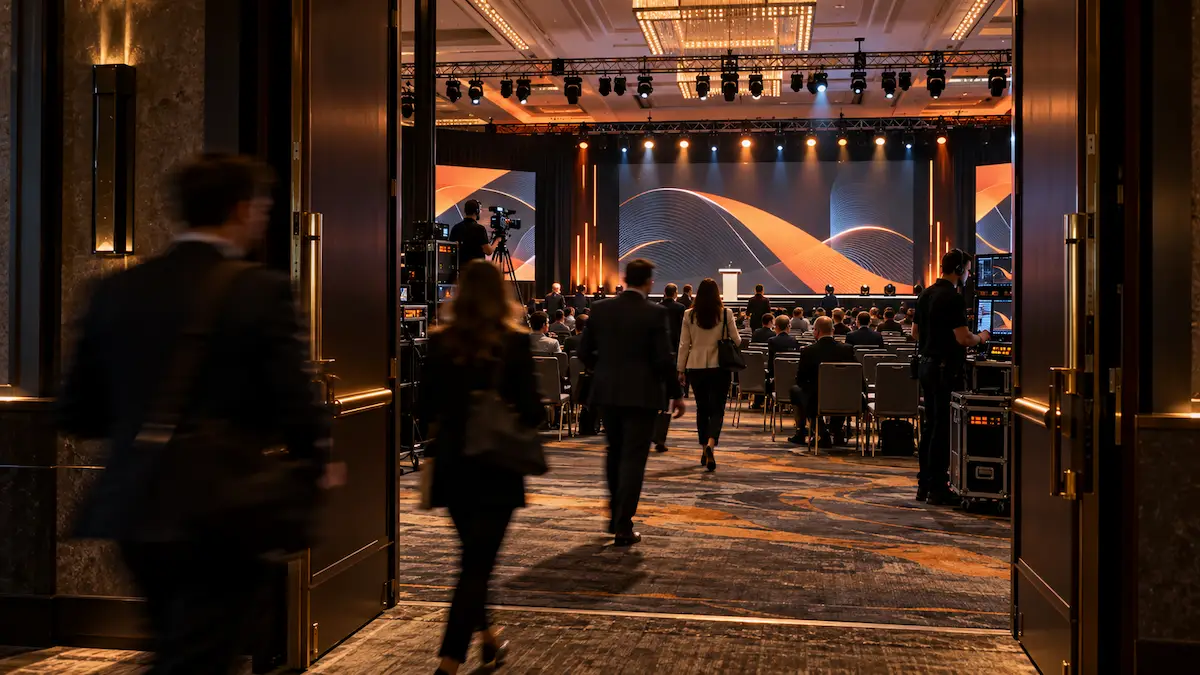
Most corporate events do not begin when the first speaker says, "Good morning."
They begin when the doors open.
Attendees are already forming an opinion as they enter the room.
They notice whether the space feels organized. They see what is on the screens. They hear the music. They decide where to sit. They look for colleagues. They may check the agenda, answer an email, or wonder whether they are even in the right room.
All of that happens before the official program begins.
That makes the pre-show experience an important part of event production.
The goal is not to turn the walk-in period into another performance.
It is to make the room feel ready.
The Room Should Feel Intentional Before Anyone Speaks
There is a noticeable difference between a room that is technically open and a room that feels ready for an audience.
Before attendees enter, the production team should already be thinking about:
- what is displayed on the screens
- what music is playing
- how the room is lit
- whether microphones are ready
- whether presenters are in position
- whether staff know what happens next
- whether entrances and seating areas are clear
- whether the first cue of the show is ready to go
The audience may never consciously notice most of those details.
That is often the point.
A strong pre-show experience should feel natural.
Give the Screens Something Useful to Do
A blank screen rarely helps the room feel prepared.
Neither does leaving a presentation desktop, file browser, login screen, or technical test pattern visible while attendees enter.
Instead, the display system should have an intentional walk-in state.
That might include:
- an event identity graphic
- a simple welcome screen
- sponsor recognition
- schedule information
- a session title
- subtle animated branding
- instructions for audience participation
- accessibility information
- a countdown when appropriate
The content does not need to move constantly.
Sometimes a clean, well-designed holding graphic is better than a screen filled with animation.
The important part is that whatever appears on the displays looks like it belongs there.
Music Sets the Tone Before the Program Begins
Walk-in music can change how a room feels almost immediately.
It can make a large ballroom feel active before it fills.
It can make an executive meeting feel polished.
It can help distinguish the general session from the hallway outside.
But the music should support the event, not compete with it.
Volume matters.
Attendees should still be able to speak with one another without shouting.
The style of music should also make sense for the audience and event.
A leadership meeting, awards program, customer conference, and employee celebration may all call for very different approaches.
The transition out of walk-in music matters too.
The music should not simply stop because someone remembered the program was about to begin.
That transition can become part of the opening cue.
Lighting Can Signal That Something Is About to Happen
The room does not have to look exactly the same during walk-in as it does during the program.
Pre-show lighting can help create atmosphere while still allowing attendees to move safely, find seats, read materials, and interact with one another.
As show time approaches, a lighting change can quietly tell the audience that the program is about to begin.
The room may become slightly more focused.
Stage lighting may become more prominent.
House lighting may change.
Screens may move from a welcome graphic to the opening sequence.
These changes do not have to be dramatic.
Small, coordinated cues can create a clear transition from arrival to attention.
Do Not Forget What the Audience Is Actually Doing
Production teams naturally pay attention to the stage.
Attendees are paying attention to much more than the stage when they arrive.
They are looking for seats.
They may be trying to find coworkers.
They may need an accessible seating location.
They may want to know where restrooms or exits are.
They may be trying to understand whether there is a quiet area available.
They may have questions about Wi-Fi, Q&A, interpretation, captions, or the schedule.
That means the pre-show experience is partly about removing uncertainty.
Clear signage, helpful staff, accessible pathways, readable screens, and sensible room flow can make the audience more comfortable before the program ever starts.
For larger events, this may also connect with accessibility planning such as quiet rooms and sensory-friendly spaces or live captions and accessibility.
The Presenters Have a Pre-Show Experience Too
While the audience is entering, presenters are often going through a very different experience backstage.
Someone may be confirming the next speaker.
A microphone may be getting fitted.
Slides may be receiving a final update.
A presenter may be asking whether they advance their own deck.
The moderator may need to know where to stand.
A remote speaker may be waiting to join.
This is where good preparation becomes visible behind the scenes.
The minutes immediately before show time should not be used to figure out basic production questions that could have been handled earlier.
That is one reason a proper corporate event technical rehearsal matters.
By the time the audience is entering, the focus should be on final confirmation, not discovery.
Presenter comfort matters too. A calm, organized pre-show process can help speakers walk onstage feeling prepared rather than rushed.
We covered that in How to Keep Presenters Comfortable Before They Walk Onstage.
Build a Real Opening Cue
One of the easiest ways for an event to feel less polished is for the program to simply begin without a clear transition.
The opening can be simple.
For example:
Walk-in music is playing.
The room lights shift.
The music fades.
The screens transition.
A voice of god announcement welcomes the audience.
The opening video rolls.
The first speaker walks onstage.
Not every event needs all of those elements.
The point is that the beginning should be intentional.
Everyone involved should know the first cue, who calls it, and what happens next.
The audience should feel that the event has started.
Countdown Carefully
Countdown clocks can be useful, but they are not always necessary.
A visible countdown can help attendees understand when the session begins and encourage them to take their seats.
It can also be useful for large general sessions where people are arriving over an extended period.
But once you put a countdown on a screen, you are making a promise.
If the clock reaches zero and nothing happens for another six minutes, the countdown loses its purpose.
Use one when the team is reasonably confident that the show can begin when it says it will.
Otherwise, a simple welcome or holding graphic may be the better choice.
Housekeeping Does Not Have to Feel Like Housekeeping
The minutes before a session can also be used to communicate useful information.
That might include:
- how audience Q&A will work
- whether phones should be silenced
- how to access the event app
- where captions are available
- what session is coming next
- safety information when required
- where to find event resources
Some of this can appear on screens.
Some may be communicated by staff.
Some belongs in the opening remarks.
The key is not to overload the audience.
If attendees are shown ten instructions at once while they are walking into the room, most of them will be ignored.
Prioritize what they need to know at that moment.
Q&A Planning Can Start Before the Session
If the program will include audience questions, the pre-show period is a good time to establish how that will work.
Screens can identify that Q&A will be available.
Staff can make sure microphones are positioned correctly.
Mic runners can understand their coverage areas.
Moderators can review how questions will be handled.
For digital Q&A, attendees can be shown where to submit questions before the discussion begins.
That preparation makes the Q&A feel much more natural later.
For more on that process, see How to Plan Audience Q&A Without Losing Control of the Room.
Watch the Clock Without Rushing the Audience
Pre-show timing is a balancing act.
Open the room too early and attendees may sit in an empty-feeling ballroom for a long time.
Open too late and hundreds of people may still be looking for seats when the program is supposed to begin.
The right timing depends on audience size, room layout, security, registration flow, distance from breaks or meals, and how quickly people can enter.
The production plan should account for that.
The team also needs a clear point where casual walk-in mode begins turning into show mode.
That may be ten minutes out, five minutes out, or closer to the opening depending on the event.
What matters is that the transition is planned.
The Pre-Show Is Part of the Show
A professional event does not suddenly become professional when the first microphone goes live.
The audience has already been experiencing it.
The lighting was telling them something.
The screens were telling them something.
The music was telling them something.
The staff, room setup, timing, and organization were telling them something too.
The best pre-show periods do not necessarily call attention to themselves.
They make the room feel prepared.
They help attendees settle in.
They give presenters confidence.
They give the production team a controlled path into the opening cue.
And when show time arrives, the event does not have to struggle to get everyone's attention.
It already has it.
Outta Time Productions plans live events around the complete audience experience, including what happens before the program officially begins.
That means coordinating screens, audio, lighting, presenters, timing, room readiness, accessibility, and opening cues so the first few minutes of the show are not spent trying to recover from an unplanned start.
If you are planning a corporate meeting, conference, general session, or executive event, Begin Planning early enough to think about what your audience experiences before the first speaker ever walks onstage.
The first cue of an event may happen onstage, but the audience experience begins the moment the doors open.